PF Return Filing in India: Due Dates, ECR Steps, Documents & Penalties
Employers in India must file their monthly Provident Fund (PF) return through the Electronic Challan-cum-Return (ECR) on the official EPFO Unified Employer Portal. The return covers employee wage details and PF contribution information. Generally, employers must file the ECR and deposit the applicable PF contributions by the 15th of the following month. Therefore, the regular due date for October 2026 wages is 15 November 2026.
Another important update is the revision of the EPFO wage ceiling. Effective 17 September 2026, the statutory wage ceiling for mandatory EPFO coverage has increased from ₹15,000 to ₹25,000 per month, subject to applicable rules. This change may bring more employees under PF coverage and requires employers to review their payroll records, employee eligibility, and contribution calculations. Filing returns accurately and on time helps businesses maintain compliance and avoid unnecessary penalties.
What changed in 2026
Three changes affect how you file, and most guides online haven’t caught up.
The law moved. PF rules now sit under the Code on Social Security, 2020. The Employees’ Provident Funds Scheme, 2026 was notified on 29 June 2026 and replaced the 1952 Scheme.
The wage ceiling went up. For mandatory PF, pension (EPS) and insurance (EDLI) coverage, the ceiling rose from ₹15,000 to ₹25,000 per month from 17 September 2026. Contribution rates did not change. The Ministry of Labour estimates that over 51 lakh more employees now come under mandatory coverage.
Penalties were rewritten. Damages for late payment are now charged per month on a three-step scale, and a separate late fee applies to late returns. Both are covered below.
What is Provident Fund (PF)?
The Provident Fund (PF), also known as the Employees’ Provident Fund (EPF), is a savings scheme designed to help employees secure their financial future. It allows employees to save a portion of their salary every month, which can be used after retirement or when they meet the conditions for withdrawal. The scheme encourages regular savings and helps employees build a financial safety net for their later years.
Under the EPF scheme, both the employer and the employee contribute a certain percentage of the employee’s eligible salary towards the fund every month. These contributions accumulate over time and earn interest, helping the savings grow. This means employees can build a retirement fund without having to save a large amount all at once.
The Employees’ Provident Fund Organisation (EPFO) manages the scheme under the Ministry of Labour and Employment, Government of India. Besides retirement savings, the EPF system also offers other important benefits. These include the Employees’ Pension Scheme (EPS), which provides pension benefits to eligible members, and the Employees’ Deposit Linked Insurance (EDLI) scheme, which provides life insurance benefits to eligible employees’ families in case of their death while in service.
Overall, PF helps employees develop a habit of saving, prepare for retirement, and gain additional financial protection for themselves and their families.
What is a PF return?
A PF return is a monthly report that employers submit to the Employees’ Provident Fund Organisation (EPFO). It contains details of employees’ wages and their Provident Fund (PF) contributions. Employers submit this report through the Electronic Challan-cum-Return (ECR) system on the EPFO employer portal.
Since September 2025, EPFO has introduced a revamped ECR system that separates return filing from payment. Employers must now follow these steps:
Submit the PF return: Upload the ECR file containing employee and contribution details.
Check and approve: Review the return details and approve the return after checking for errors.
Generate the challan and pay: Once the return is approved, generate the payment challan and deposit the applicable PF contributions.
The ECR file format has not changed, so employers can continue using the existing file layout. However, the new system includes additional checks to help prevent errors and improve the accuracy of PF returns.
In simple words, a PF return reports employee contributions, while the challan is used to pay the amount due to EPFO.
What is the PF Return Due Date for Employers?
Both the return and the payment are due by the 15th of the following month. There is no grace period.
Wage month
Due date
October 2026
15 November 2026
November 2026
15 December 2026
December 2026
15 January 2027
January 2027
15 February 2027
February 2027
15 March 2027
March 2027
15 April 2027
15 November 2026 falls on a Sunday. Don’t count on an extension. Pay by Friday 13 November so bank delays don’t catch you.
What you contribute from October 2026
The rates are unchanged: 12% from the employee, 12% from the employer. The employer’s 12% splits into 8.33% for pension (EPS) and 3.67% for EPF. EDLI (0.5%) and administrative charges (0.5%) are paid on top by the employer.
EPFO’s own examples for a full month from October 2026:
Monthly PF wages
Employee EPF (12%)
Employer EPS (8.33%)
Employer EPF (3.67%)
EDLI (0.5%)
Admin (0.5%)
₹15,000
₹1,800
₹1,250
₹550
₹75
₹75
₹20,000
₹2,400
₹1,666
₹734
₹100
₹100
₹25,000
₹3,000
₹2,083
₹917
₹125
₹125
₹35,000
₹3,000
0
₹3,000 (at 12%)
₹125
₹125
Four points to get right:
“Wages” is not your gross salary or CTC. The ceiling applies to wages as defined under section 2(88) of the Code. A person with ₹50,000 gross and ₹25,000 PF wages is covered.
Newly covered staff must be enrolled by you. Employees with PF wages between ₹15,000 and ₹25,000 become members of EPF, EPS and EDLI. They don’t have to apply. The enrolment responsibility is the employer’s.
EPS eligibility depends on wages at joining. EPS membership is available only to employees whose wages at joining, or on the date the new ceiling started, did not exceed the ceiling.
Minimum admin charge applies. It is ₹500 a month if the establishment has at least one contributing member, and ₹75 if it has none.
The September 2026 transition
September was a split month. The ₹25,000 ceiling applied from 17 September, so employers filed one ECR with two calculation periods:
1 to 16 September used the old ₹15,000 ceiling.
17 to 30 September used the new ₹25,000 ceiling.
EPFO’s example is an existing member on the ₹15,000 cap whose wages are ₹20,000. September wages count as ₹15,000 × 16/30 plus ₹20,000 × 14/30, which is ₹17,333.33. The contributions come to:
Employee EPF: ₹2,080
Employer EPS: ₹1,443.87
Employer EPF: ₹636.13
EDLI and admin: ₹86.67 each
That is ₹4,333.34 in total for that member.
If you couldn’t deduct the extra employee share from September salary, EPFO allowed you to recover it in the next payroll without special approval. The ECR and full remittance still had to be done by 15 October. If you haven’t checked your September return against this split, do it now.
How to file PF return (revamped ECR): Step by Step
Employers can file their monthly Provident Fund (PF) returns online through the EPFO Employer Portal. The process involves preparing an Electronic Challan-cum-Return (ECR) file, submitting employee details, checking the return, approving it, generating the payment challan, and paying the PF contributions.
Follow these steps to understand how the process works.
Step 1: Log in to the EPFO Employer Portal
Visit the official EPFO website and open the employer services section. Select the option for online ECR or challan submission to access the employer portal.
Log in using your establishment’s registered username and password. Keep your login details secure and ensure that any required digital authentication arrangements are in place.
Step 2: Prepare the ECR File
Prepare the Electronic Challan-cum-Return (ECR) file containing the details of employees and their PF contributions. You can generate this file using payroll software or prepare it according to the format prescribed by EPFO.
The file generally contains details such as:
Employee’s Universal Account Number (UAN).
Employee’s name and applicable wage details.
Employee’s PF contribution.
Employer’s PF contribution.
Pension contributions, where applicable.
Non-Contributory Period (NCP) days, if applicable.
Joining or leaving details, wherever required.
Check the employee details and contribution amounts carefully before uploading the file.
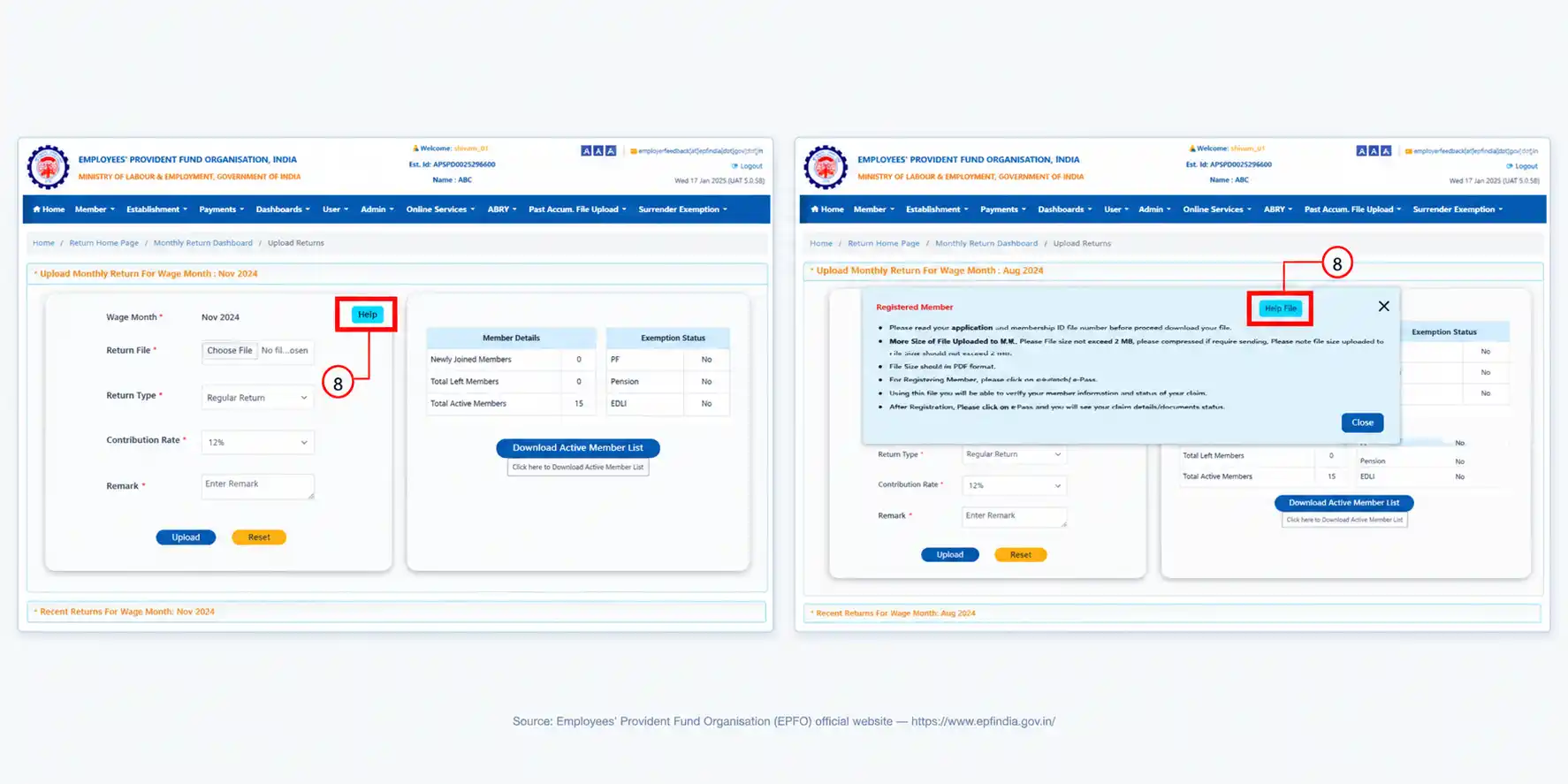
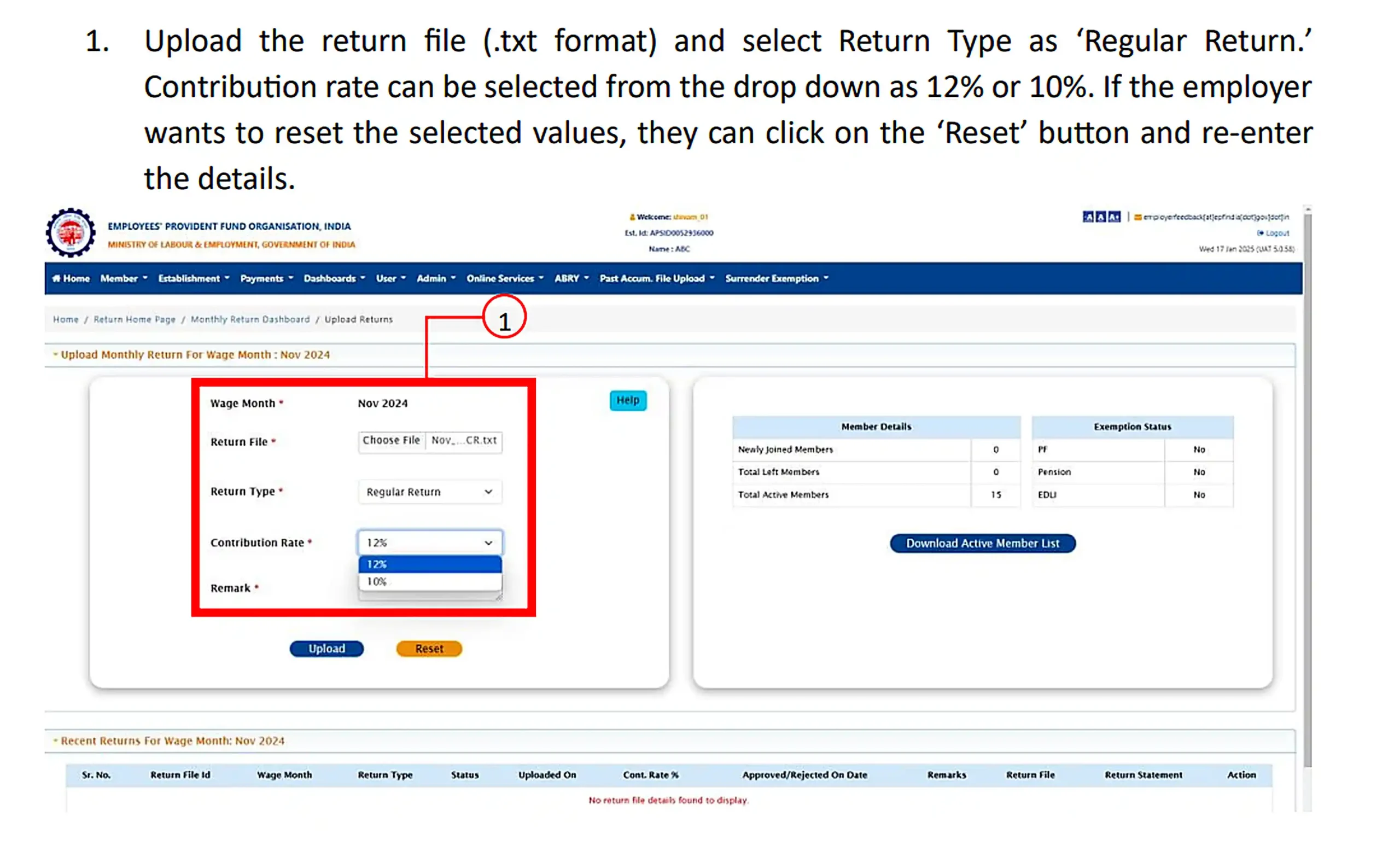
Step 3: Upload and Submit the ECR File
Log in to the EPFO Employer Portal and open the ECR filing section. Select the relevant wage month and enter the details requested by the portal.
Upload the prepared ECR text file and submit it for processing. Make sure you select the correct wage month and provide accurate information about employee wages and contributions.
Step 4: Check and Correct Errors
After uploading the file, the EPFO system checks the information provided. It may identify errors involving UANs, wages, contribution amounts, or other employee details.
If an error appears, correct the relevant information and follow the portal’s instructions to resubmit the file. If the file passes the required checks, proceed to review the return statement.
Step 5: Review and Approve the Return
Under the revamped ECR system, return submission and payment are separate processes. After uploading the file, review the return statement carefully to confirm that the employee details and contribution figures are correct.
Once you are satisfied with the information, approve the return through the portal. After approval, the system generates a Due Deposit Balance Summary, which helps you check the amount payable.
Keep the return reference details for your records.
Step 6: Generate the PF Payment Challan
After approving the return, proceed to the payment section and generate the challan using the available options on the portal.
The challan shows the PF contributions and other applicable charges. Depending on the establishment’s obligations, these may include EPF contributions, Employees’ Pension Scheme (EPS) contributions, Employees’ Deposit Linked Insurance (EDLI) contributions, administrative charges, and applicable interest or damages.
Check the amounts displayed on the portal before proceeding with payment.
Step 7: Pay the PF Contributions Online
Once the challan has been generated, select the available payment option and follow the portal’s instructions to complete the payment through an authorised banking facility.
Make sure the payment is completed successfully. If the portal provides multiple challans, check the details carefully to avoid duplicate payments for the same employees or wage period.
Step 8: Download and Save the Payment Records
After completing the payment, download the available challan and payment receipt. Keep these documents along with the approved return and other payroll records.
These documents help you confirm the amount paid and provide supporting evidence if you need to check your PF compliance history later.
Important: EPFO’s revamped ECR system applies from the September 2025 wage month onwards. The official guidelines also provide for different return types, including regular, supplementary, and revised returns, subject to the applicable conditions. Always follow the instructions displayed on the portal for your particular filing.
Rules that catch people out under the revamped system:
Returns go in sequence. You can’t file October if September is still pending.
Approved returns can’t be cancelled. Corrections go through a revised return, and missed employees go through a supplementary return.
EPS is blocked automatically for members aged 58 and above unless they are marked for deferred pension.
Documents Required for PF Return Filing
Employers must maintain accurate employee, salary, contribution, and payment records to file their monthly Provident Fund (PF) returns correctly. These documents help employers calculate contributions, submit the Electronic Challan-cum-Return (ECR), and respond to any compliance queries from EPFO.
The documents generally required for PF return filing are listed below.
Document or Record
Purpose
Maintained By
Electronic Challan-cum-Return (ECR)
Contains employee-wise wage and PF contribution details for the relevant month.
Employer / Payroll Department
PF Challan
Shows the amount payable to EPFO against the relevant return.
EPFO Employer Portal
PF Payment Receipt
Provides proof that the PF contribution payment was completed.
Employer / Bank
Employee Details
Includes UAN, joining date, leaving date, and other information required for PF compliance.
HR / Payroll Department
Salary Register or Payroll Report
Provides salary and wage details used to calculate PF contributions.
HR / Payroll Department
Attendance and Leave Records
Help verify attendance, unpaid leave, and non-contributory days, where applicable.
HR Department
Employee Joining and Exit Records
Help establish PF membership and update employee service details.
HR Department
Bank Statements
Help reconcile PF payments and verify bank transactions.
Employer / Bank
Employee Declarations and Nomination Records
Help maintain membership, previous employment, and nomination information as applicable.
Employer / Employee
Authorisation Documents
May be required when an authorised representative handles compliance matters.
Employer
Important: The ECR, challan, and payment receipt are particularly important for monthly PF compliance. Forms 3A and 6A are associated with the older contribution-record system and should not be presented as separate routine monthly filing requirements under the current electronic process.
Employers should also maintain supporting payroll records even when the EPFO portal generates the contribution summary automatically.
Key PF Forms and Their Uses
Employers and employees may need different forms for Provident Fund (PF) registration, employee declarations, nominations, transfers, and withdrawals. Understanding these forms helps you complete the correct process without confusion. However, not every PF form is required for monthly PF return filing. Employers now use the Electronic Challan-cum-Return (ECR) system for routine monthly contribution reporting.
The following table explains the purpose of commonly used PF forms and their general applications.
PF Form
Name or Purpose
When Is It Used?
Form 2
Nomination and declaration form under the applicable EPF provisions
For recording nominations and related member information, subject to the applicable procedure
Form 3A
Individual annual contribution statement
Associated with the traditional employee-wise PF contribution records
Form 5
Traditional monthly employee membership return
Historically used to report employees who became members during the month
Form 6A
Consolidated annual contribution statement
Associated with the traditional annual contribution reporting system
Form 10
Traditional employee exit return
Historically used to report employees leaving service; it is not the general PF withdrawal claim form
Form 11
Employee declaration form
Used when an employee joins an establishment covered by EPF provisions to declare previous employment and membership details
Form 13
PF transfer form
Used for transferring PF accumulations from a previous account to another account, where applicable
Form 19
Final EPF settlement claim
Used by eligible members to claim their final EPF balance
Form 31
PF advance or partial withdrawal claim
Used by eligible members to apply for a permitted advance or partial withdrawal
Form 10C
EPS withdrawal benefit or scheme certificate claim
Used for eligible benefits under the Employees’ Pension Scheme
Form 10D
Pension claim form
Used to claim a monthly pension under the applicable EPS provisions
Important: Forms 3A, 5, 6A, and 10 are associated with traditional contribution-reporting or employee-record procedures. They should not all be described as separate mandatory monthly filings under the current ECR system. Employers should follow the latest electronic procedures and instructions issued by EPFO.
What happens if you file or pay late
You can face three separate charges:
Interest. 12% per annum, simple interest, on the delayed amount from the due date until payment.
Damages (per month, on arrears).
How late
Damages
Less than 2 months
0.25% per month
2 months to under 4 months
0.50% per month
4 months or more
1% per month
Late fee for the return. ₹500 per day for delay in filing a return. It cannot exceed the administrative charges payable for that month.
Rough illustration: ₹1,00,000 paid about three months late carries around ₹3,000 in interest and around ₹1,500 in damages. The portal calculates the exact figures when you generate the challan.
Common mistakes
Applying ₹25,000 to the whole of September instead of splitting the month
Treating total salary or CTC as PF wages
Forgetting to enrol employees in the ₹15,000-₹25,000 band, including for EPS
Approving the return and generating a challan but not actually paying
Filing out of sequence after a missed month
For employees
PF interest was 8.25% per annum for FY 2025-26. The wage ceiling change means more of your salary may now go into your PF account. Your employer’s matching share goes in too. The EPFO FAQ notes that the maximum EDLI cover stays at ₹7 lakh despite the higher ceiling.
FAQs
What is the due date for PF return filing?
The 15th of the month following the wage month. The return and the payment share the same deadline, and there is no grace period.
Is there a separate monthly PF return?
No. The ECR is the monthly return and also generates the payment challan.
Does the ₹25,000 ceiling apply to my whole September payroll?
No. It applied from 17 September. September was filed in one ECR with two calculation periods.
Can I fix a mistake after the return is approved?
You can’t cancel an approved return. You file a revised return to correct it, or a supplementary return for missed employees.
Does a higher ceiling raise the EDLI benefit?
No. The maximum EDLI benefit remains ₹7 lakh.
Sources: Ministry of Labour & Employment press release (16 September 2026); EPFO FAQs on revision of the statutory wage ceiling; Notification S.O. 5109(E); Employees’ Provident Funds Scheme, 2026 (G.S.R. 525(E)). Last updated: 19 October 2026.
Submit your Details to get an Instant All-inclusive Quote and a FREE Expert consultation