GST • Income Tax • Registration • Payroll • Advisory • FSSAI • Virtual CFO

How to Check Your GST Registration Status Online (2026 Step-by-Step)

You can check your GST registration status online through the official GST Portal using your ARN (Application Reference Number). If you have only started the application and have a TRN (Temporary Reference Number), you can use the TRN to access the application. Once registration is approved, your GSTIN can be used to verify your registration details.

Quick steps

  1. Go to the official GST Portal.
  2. Open the registration/application tracking option.
  3. Select the appropriate tracking method.
  4. Enter your ARN or TRN, depending on the stage of your application.
  5. Enter the captcha.
  6. Click Search/Submit.
  7. Check the status displayed on the screen.
  8. If clarification is requested, follow the instructions shown on the portal.
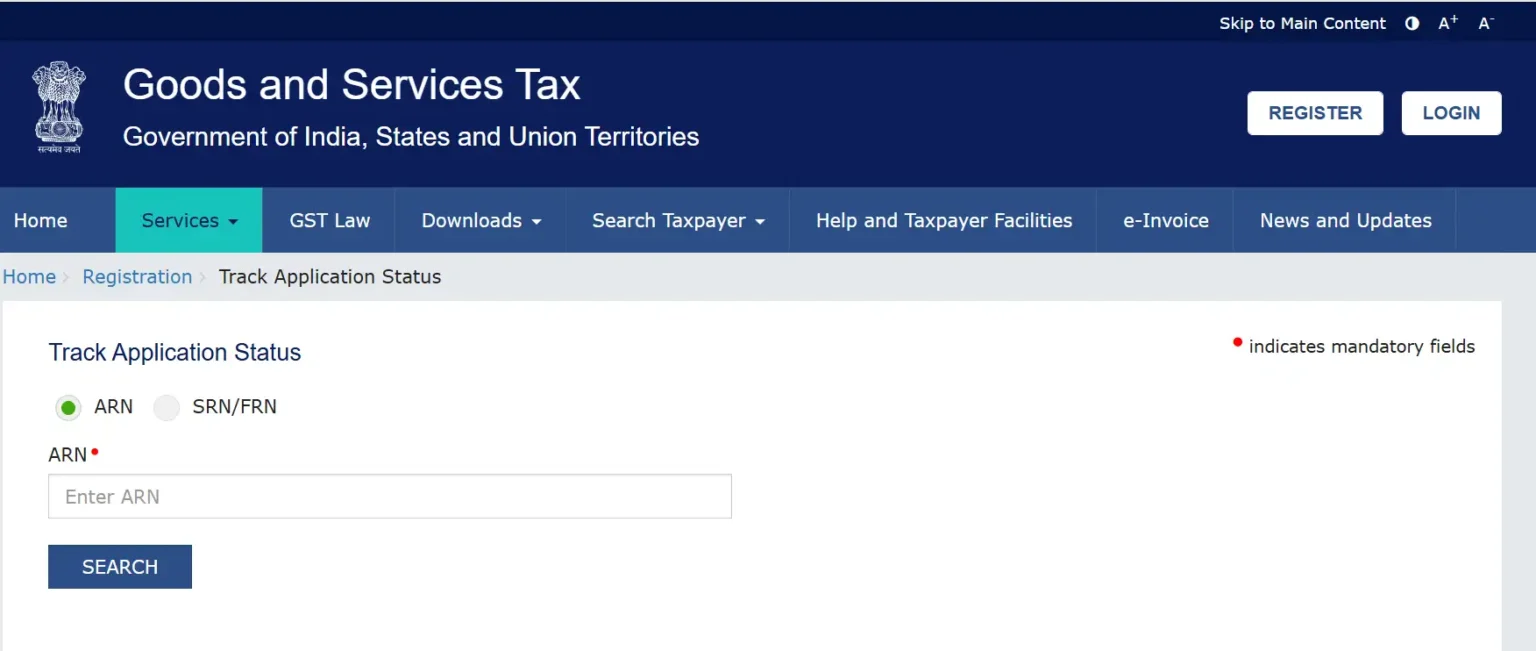
Official GST Portal Track Application Status page showing ARN input field for GST registration Status tracking

What Is GST Registration Status?

GST registration status tells you the current stage of your GST registration application or the status of an existing GST registration.

Your application may move through different stages, such as:

  • Application submitted
  • Pending for processing
  • Clarification required
  • Approved
  • Rejected
  • Registration cancelled/suspended, where applicable

The exact status you see determines what you should do next.

How to Check GST Registration Status Online

If you are searching for how to check GST registration status, the process is straightforward.

Step 1: Visit the GST Portal

Go to the official GST website: gst.gov.in.

Always use the official government portal when entering your GST application details.

Step 2: Find the Registration Tracking Option

Navigate to the relevant option for tracking your GST registration/application.

The GST Portal periodically updates its interface, so the exact menu placement may change.

Step 3: Enter Your ARN

If you have already submitted your GST registration application, enter your ARN.

Your ARN is generally provided after successful submission of the application.

Step 4: Enter the Captcha

Enter the captcha displayed on the screen.

Make sure the characters are entered correctly.

Step 5: Click Search

Submit the details and wait for the GST Portal to display your application information.

Step 6: Check Your GST Registration Status

Read the complete status message carefully.

Do not assume that every “Pending” status means there is a problem. The next action depends on the exact status shown by the portal.

How to Check GST Registration Status Using ARN

The ARN is the key reference number used to track a successfully submitted GST registration application.

You can generally find your ARN in:

  • GST acknowledgement
  • Registration application communication
  • Email received from the GST Portal
  • SMS received after successful submission

ARN tracking in simple terms

GST application submitted → ARN generated → Enter ARN → View GST registration status

Keep your ARN safely stored until the registration process is completed.

How to Check GST Registration Status Using TRN

Follow these simple steps to check your GST registration application status using TRN:

  1. Visit the official GST portal.
  2. Go to Services → Registration → Track Application Status.
  3. Select TRN (Temporary Reference Number) as the search option.
  4. Enter your TRN and the captcha displayed on the screen.
  5. Click Proceed.
  6. Enter the OTP received on your registered email address or mobile number.
  7. After verification, your GST registration application status will be displayed on the screen.

TRN vs ARN: Difference Between TRN and ARN in GST Registration

A TRN (Temporary Reference Number) is generated when you start the GST registration application and is used to access, save, and continue the application before it is successfully submitted.

A TRN allows you to return to your partially completed GST registration application and complete the remaining details on the GST portal.


An ARN (Application Reference Number) is generated after a GST registration application is successfully submitted and is used to track the application status on the GST portal.

An ARN is generally generated once the GST registration application has been submitted and can be used to check the progress and status of the application until the registration process is completed.

TRN vs ARN

Feature

TRN

ARN

Full form

Temporary Reference Number

Application Reference Number

Stage

Application being prepared

Application successfully submitted

Main use

Access/continue application

Track submitted application

GSTIN issued?

No

Not necessarily

Simple rule: If you have completed and submitted the application, look for your ARN. If you have only started the application, your TRN may be relevant.

How to Check GSTIN Status Online

If your GST registration has already been approved, you will have a GSTIN (Goods and Services Tax Identification Number).

You can use the GST Portal’s taxpayer services to check registration-related information associated with the GSTIN.

You should verify:

  • GSTIN
  • Legal business name
  • Registration status
  • Taxpayer type
  • Registration date
  • Principal place of business
  • Cancellation/suspension information, where applicable

For registered taxpayers, the GST Portal also provides access to the GST registration certificate through the taxpayer dashboard.

GST Registration Status Meaning

Understanding the status is just as important as finding it.

GST Status

What It Generally Means

What You Should Do

Pending for Processing

Application is awaiting processing

Monitor the application

Clarification Required

Additional information/clarification may be required

Check the portal and respond as instructed

Approved

Registration has been approved

Check your GSTIN and certificate

Rejected

Application was not approved

Review the reason and applicable next steps

Cancelled

Existing registration has been cancelled

Review cancellation details

Suspended

Registration is temporarily under suspension in applicable circumstances

Check the portal for the reason and required action

Important: The exact legal effect of a particular status depends on the circumstances and the communication issued through the GST system.

What Does "GST Registration Pending" Mean?

If your GST registration status shows Pending, it generally means the application has not yet reached its final stage.

A pending status does not automatically mean your application has been rejected.

Before taking any action, check:

  • Whether the application is pending for processing
  • Whether a clarification has been requested
  • Whether you have received a GST notice
  • Whether any additional action is required from you
  • Whether your ARN is correct

If the portal asks for clarification, don’t simply wait for approval. Follow the instructions provided through the GST system.

What Does "Clarification Required" Mean in GST?

A clarification request means the GST authority has asked for additional information or clarification concerning your application.

If you see this status:

  1. Log in to the GST Portal.
  2. Check the relevant application/notice.
  3. Read the clarification request carefully.
  4. Prepare the required information or documents.
  5. Submit the response within the applicable time.
  6. Continue monitoring the application status.

Do not ignore a clarification request, because failing to respond appropriately can affect the application.

What If GST Registration Application Is Rejected?

If your GST registration application is rejected, first identify the reason for rejection.

Common issues can involve things such as:

  • Incorrect information
  • Incomplete information
  • Document-related issues
  • Address or business-place verification issues
  • Failure to provide required clarification
  • Other application-specific concerns

The appropriate next step depends on the reason communicated by the GST authorities.

Do not automatically submit a fresh application without first reviewing the rejection order or communication.

How Long Does GST Registration Take?

There is no single timeline that should be assumed for every GST registration application.

Processing can depend on:

  • Completeness of the application
  • Document verification
  • Aadhaar authentication or other verification requirements
  • Whether clarification is requested
  • Whether physical or additional verification is required
  • Action required from the applicant
  • Processing by the relevant tax authority

Therefore, instead of relying only on a fixed number of days, check your GST registration status using your ARN.

GST Registration Status Not Showing: What to Do?

If you cannot find your application status, check these points first:

  • Verify your ARN: Make sure every character is correct.
  • Check whether you have an ARN or TRN: They are used at different stages.
  • Check your acknowledgement: Your ARN should be available there if the application was successfully submitted.
  • Try again later: Temporary portal issues can occur.
  • Check your email/SMS: Look for communication from the GST system.
  • Check for clarification requests: Your application may require action.
  • Contact the appropriate GST support/jurisdictional authority if the issue continues.

Don’t delay your growth. Secure your GSTIN seamlessly with Delhi’s trusted compliance team. Consult with Cotaxo’s GST Experts today to launch your application smoothly.

GST Registration Status vs GSTIN Status

These two terms are often confused.

GST registration application status tells you what is happening with an application that you submitted.

GSTIN status relates to an existing GST registration.

For example:

Application submitted → ARN → Application processing → Approval → GSTIN issued

After approval, your focus generally shifts from tracking the application to managing the GST registration and complying with applicable GST requirements.

Documents and Details to Keep Ready

Before checking your GST registration status, keep these details available:

  • ARN
  • TRN, if the application is still incomplete
  • GSTIN, if registration has already been granted
  • Registered mobile number
  • Registered email address
  • GST acknowledgement
  • GST application documents
  • Any notices or clarification requests

Keeping these records together makes it much easier to track your application.

Skip the paperwork hassle. Get your GST registration done quickly and accurately with Cotaxo’s Rohini, Delhi  team. [Contact Cotaxo Now]

Why Checking GST Registration Status Matters

Checking your status is useful because it tells you whether you need to take action.

For example:

  • Pending: You may simply need to monitor the application.
  • Clarification required: You may need to submit information.
  • Approved: You can verify your GSTIN and registration certificate.
  • Rejected: You need to review the reason and applicable remedy.
  • Suspended/cancelled: You should review the relevant details and take appropriate action.

The important point is simple: don’t treat every GST status the same way.

Frequently Asked Questions

Q. How can I check GST registration status online?

You can check your GST registration status online through the official GST Portal.

Quick process:

  • Visit the GST Portal.
  • Open the relevant registration/application tracking facility.
  • Enter your ARN if your application has been successfully submitted.
  • Complete the captcha.
  • Submit the request.
  • Review your current status.

If you have not completed the application, your TRN may be relevant instead.

You can check your application status using the Application Reference Number (ARN) generated after successful submission.

Steps:

  • Open the official GST Portal.
  • Go to the registration/application tracking option.
  • Enter your ARN.
  • Complete the captcha.
  • Click Search/Submit.
  • Review the status displayed.

ARN stands for Application Reference Number.

It is associated with a GST application after successful submission and is an important reference for tracking the application.

You should keep your ARN safely until the registration process is completed.

TRN stands for Temporary Reference Number.

It is generated during the GST registration process and can be used to access or continue an application before it is completely submitted.

A TRN should not be confused with an ARN.

The main difference is the stage of the application.

ARN

TRN

Application Reference Number

Temporary Reference Number

Generated after successful submission

Used during the application process

Mainly used to track the submitted application

Used to access/continue the application

Associated with a filed application

Associated with an application in progress

Check your GST application status through the GST Portal using your ARN.

If the application is approved:

  • Your GST registration is granted.
  • A GSTIN is associated with the registration.
  • You can access the applicable GST registration certificate through the portal.
  • Verify that your registration details are correct.

GST registration pending generally means that your application has not yet reached its final stage.

Check whether:

  • It is simply pending processing.
  • Clarification has been requested.
  • A notice has been issued.
  • Any action is required from you.

A pending status does not automatically mean that the application has been rejected.

First, check the exact status on the GST Portal.

Then:

  • Check your ARN.
  • Check for clarification requests.
  • Check your GST notices/communications.
  • Make sure no action is pending from your side.
  • Continue monitoring the application.
  • Contact the appropriate GST support/jurisdictional authority if the application remains pending and you need assistance.

Read the rejection communication first.

Then:

  • Identify the reason for rejection.
  • Review your application.
  • Check the supporting documents.
  • Determine whether clarification, correction, appeal, or another procedural step is applicable.
  • Consider professional assistance if the issue is complicated.

The appropriate remedy depends on the specific reason for rejection.

If your application has already been successfully submitted, the ARN is generally the relevant reference for tracking it.

If you have not completed the application, you may instead have a TRN.

If you cannot locate either number:

  • Check your GST acknowledgement.
  • Search your registered email.
  • Check GST-related SMS messages.
  • Review your application records.

Yes, if a GSTIN has already been issued, you can use the GST Portal’s taxpayer services to verify information associated with the GST registration.

Remember that GSTIN is used after registration has been granted, while ARN is primarily associated with tracking a submitted registration application.

Once your GST registration has been approved, you can access the registration certificate through the GST Portal after logging in.

The certificate contains important registration details, so download and keep a copy with your business records.

Possible reasons include:

  • Incorrect ARN or TRN.
  • Using the wrong tracking option.
  • Application not successfully submitted.
  • Temporary technical issue with the portal.
  • Incorrect application details.
  • Status not yet updated.

Verify your reference number and application acknowledgement before taking further action.

The GST Portal provides online taxpayer services for checking registration and application-related information. You should use the official GST Portal rather than paying an unofficial website simply to check the status of your application.

Cotaxo comprehensive range of expert GST registration services includes:

  • End-to-End GST Registration Services: Custom-tailored solutions designed specifically for startups, growing businesses, and independent freelancers.
  • Expert Online Management: Dedicated GST consultants handle your entire application process online, covering thorough documentation review and direct portal filing.
  • Proactive Application Tracking: Complete management of ARN tracking along with resolving any clarifications or queries raised by tax officials.
  • Final Certificate Delivery: Continuous oversight until your official, government-approved GSTIN certificate is fully generated.
  • Ongoing Compliance Support: Extended business assistance covering monthly GST return filing, composition scheme enrollment, and regular tax compliance management.

CoTaxo Compliance Mentors is widely recognized for providing the best GST registration services in Rohini, Delhi. Holding a perfect 5.0-star client rating, this team of expert GST consultants operates right out of Sector 3, Rohini to deliver fast, accurate, and completely stress-free business registrations. The entire process is handled seamlessly, from document verification and official government portal filing to ARN tracking and resolving department queries, ensuring startups and retail businesses secure their GSTIN certificates with zero delay.

Conclusion

Checking your GST registration status online is a simple way to stay updated on your GST application. The most important thing is to understand which reference number you have: TRN for an application that is still being prepared, ARN for a successfully submitted application, and GSTIN after registration has been granted.

If you’re specifically searching for how to check GST registration status, remember these steps:

  • Go to the official GST Portal.
  • Use the appropriate tracking facility.
  • Enter your ARN or TRN, depending on your application stage.
  • Complete the captcha.
  • Submit the request.
  • Read the complete status carefully.
  • Take action if clarification is requested.
  • If approved, verify your GSTIN and registration certificate.

Submit your Details to get an Instant All-inclusive Quote and a FREE Expert consultation

Call Us WhatsApp