How to File TDS Return Online: Step-by-Step Guide for 2026-27
To file a TDS return online, (1) deposit the TDS and keep the challan details, (2) download your CSI file, (3) prepare the statement in the free Return Preparation Utility (RPU), (4) validate it with the File Validation Utility (FVU), and (5) upload the validated file on the Income Tax e-filing portal using your TAN login, then verify it with a DSC or EVC. For tax year 2026-27, use Form 138 (salary), Form 140 (other payments to residents), Form 144 (payments to non-residents) or Form 143 (tax collected at source).
The first time you file a TDS return, the vocabulary alone can put you off: CSI file, RPU, FVU, TAN, challan. Underneath the jargon, it’s four jobs. You pay the tax you deducted, collect the proof of payment, prepare the statement, and upload it. This guide walks through them in the order you’ll actually do them, including the new form names that arrived on 1 April 2026.
Which Form Do You File?
Since 1 April 2026, the old form numbers have changed. The quarters and the information you report are the same.
New form (tax year 2026-27)
Old form
Used for
Form 138
24Q
TDS on salary
Form 140
26Q
TDS on payments to residents other than salary (rent, professional fees, contractors, commission and similar)
Form 144
27Q
TDS on payments to non-residents
Form 143
27EQ
Tax collected at source (TCS)
Not sure which one you need? Salary goes on 138. Anything else you pay to someone in India goes on 140. Payments to people outside India go on 144.
One exception: if you’re an individual or HUF paying rent or buying property, TDS is generally reported on a single challan-cum-statement, Form 141, within 30 days of the end of the month, not in a quarterly statement.
Old quarters keep old forms. The January to March 2026 quarter (Q4 of FY 2025-26) still uses 24Q, 26Q, 27Q and 27EQ, even if you correct it later this year.
What You Need Before You Start
Having these ready saves most of the trouble later:
What you need
Why it matters
TAN
Identifies you as a deductor. Apply on the TIN website if you don’t have one
TAN registered on the e-filing portal
Online upload doesn’t work without it
A TRACES account
Lets you check processing, download TDS certificates and request corrections
Challan details (BSR code, date, serial number)
Every payment in your statement must match a real challan
PAN, name, amount paid and TDS for every deductee
A wrong PAN is one of the most common causes of mismatches
A DSC or an EVC option
Needed to verify the statement when you upload
The latest RPU and FVU
Free utilities that prepare and check your file
How to File a TDS Return Online: Step by Step
Step 1: Pay your TDS and keep the challan details
The tax you deduct has to be paid every month, generally by the 7th of the next month. Keep the challan details for each payment: BSR code, date of deposit and serial number. You’ll need them in Step 4. For the monthly dates, see our TDS return due dates guide.
Step 2: Download your CSI file
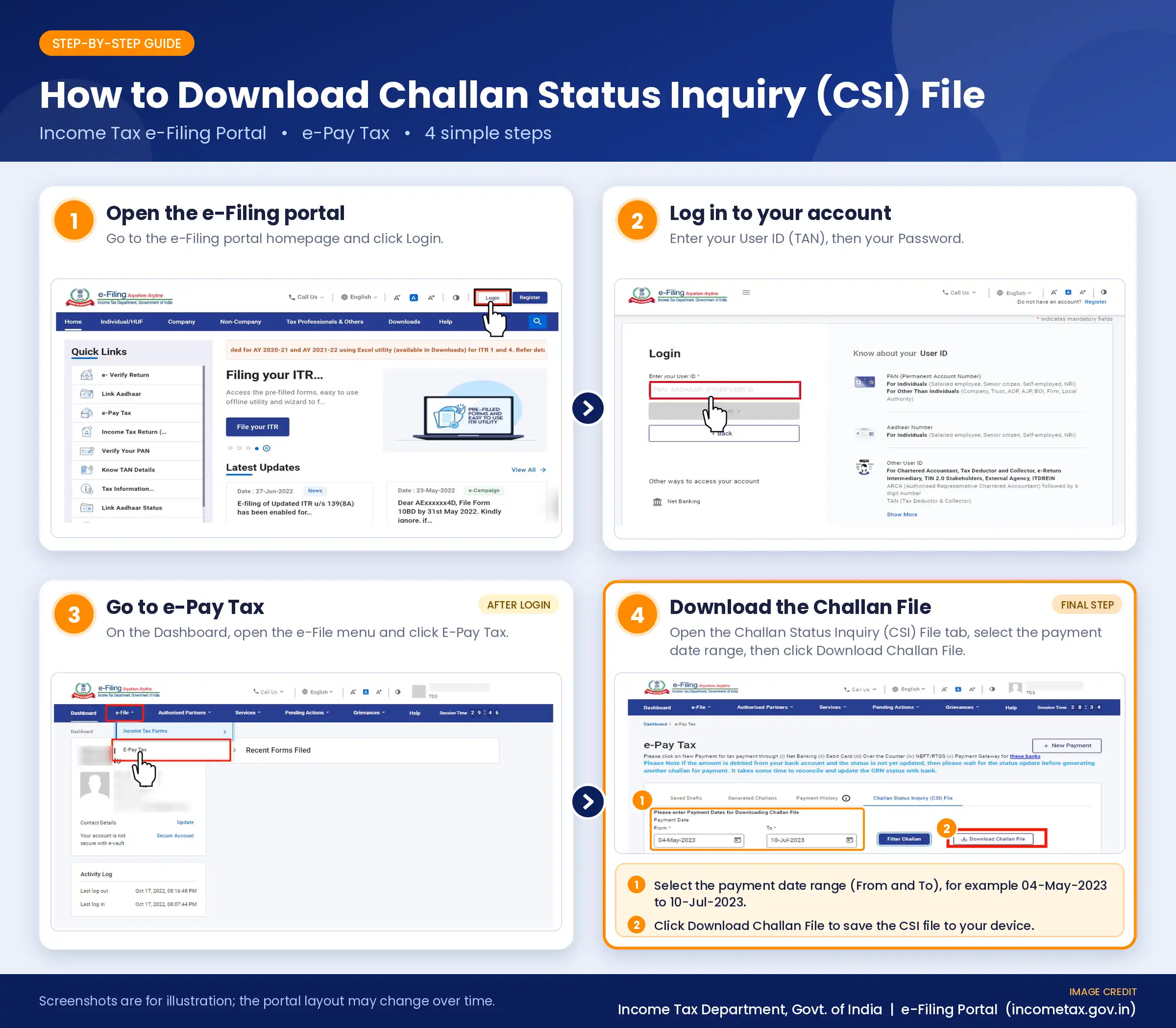
The CSI file (Challan Status Inquiry file) is the Income Tax Department’s record of the challans paid under your TAN. The RPU checks your statement against it, so you can’t claim a payment the Department can’t see.
There are two routes, and both work:
On the e-filing portal: go to e-Pay Tax, open Challan Status Inquiry, pick the date range and download the CSI file.
On the TIN OLTAS site: choose TAN-based view, enter your TAN and the date range, solve the captcha and click Download Challan file.
Tip on the date range: a quarter’s statement covers TDS deducted over three months, but the last month’s challan is paid in the next month. For Q2 (July to September), TDS deducted in September is deposited by 7 October. So your date range should run into early October, or that challan won’t appear. Don’t edit the CSI file. Load it into the RPU exactly as downloaded.
Step 3: Download the RPU and FVU
Both are free from the Protean TIN website (formerly NSDL). Look under Downloads > e-TDS/e-TCS > Quarterly Returns > Regular.
The RPU is where you prepare the statement.
The FVU checks the statement for errors and produces the file you’ll upload.
Always download the latest versions. The utilities change when forms change, and the forms changed this year.
Step 4: Prepare the statement in the RPU
Open the RPU and choose the form (138, 140, 144 or 143), the tax year, the quarter and the statement type (Regular).
Fill in your deductor details: TAN, PAN and address.
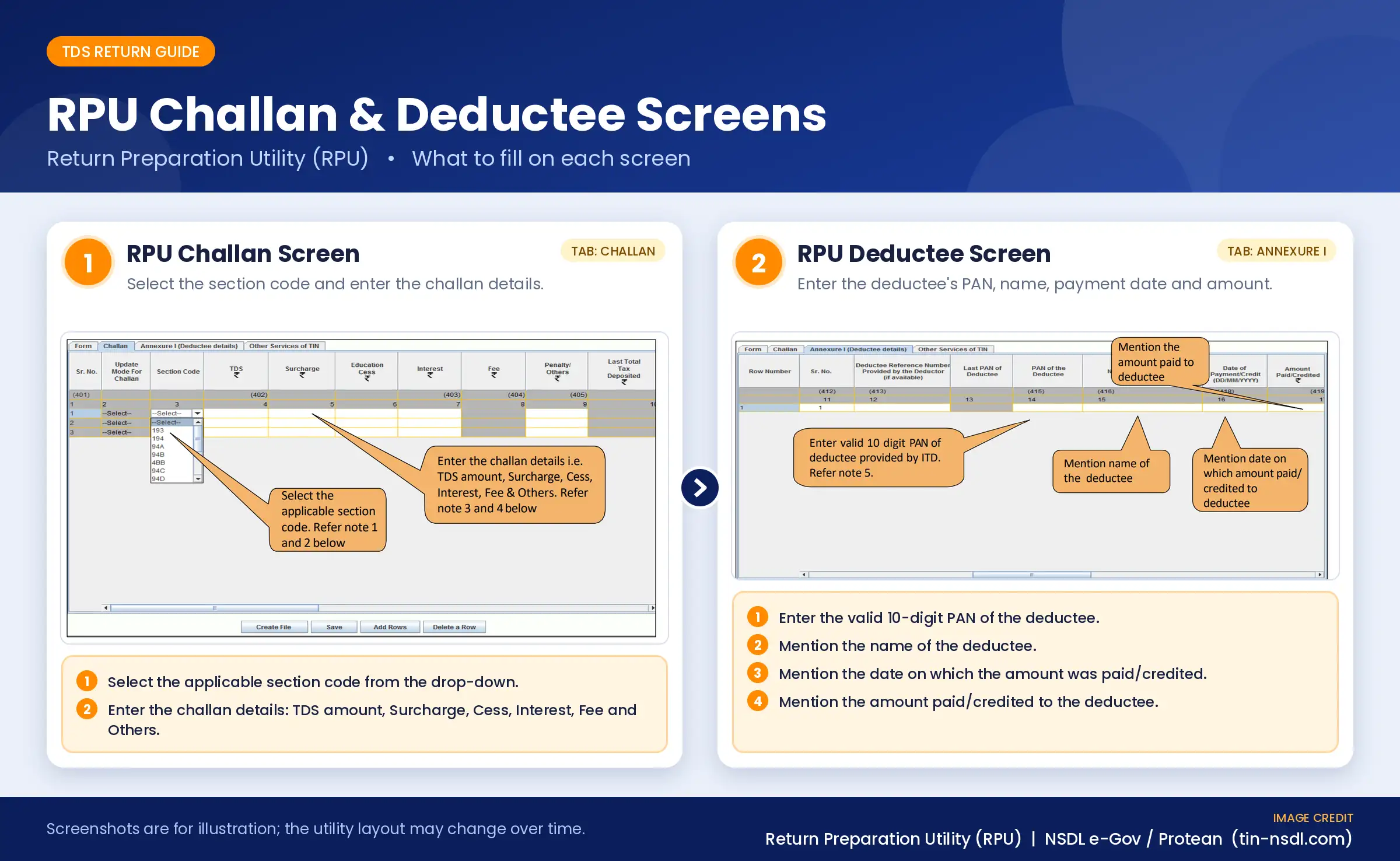
Import your challan details from the CSI file.
Enter your deductee details: PAN, name, date of payment, amount paid, TDS deducted and the section code.
Save the file.
Check that the challan totals match the TDS amounts you’ve entered for the deductees. A mismatch here is what produces errors in the next step.
Step 5: Validate the file with the FVU
Open the FVU, select your saved file and the CSI file, and run the validation. If there are mistakes, the FVU shows an error report. Fix them in the RPU, save again and re-validate. When the file passes, the FVU creates the file you’ll upload (it has a .fvu extension).
Step 6: Upload the file on the Income Tax e-filing portal
Log in to the e-filing portal with your TAN credentials.
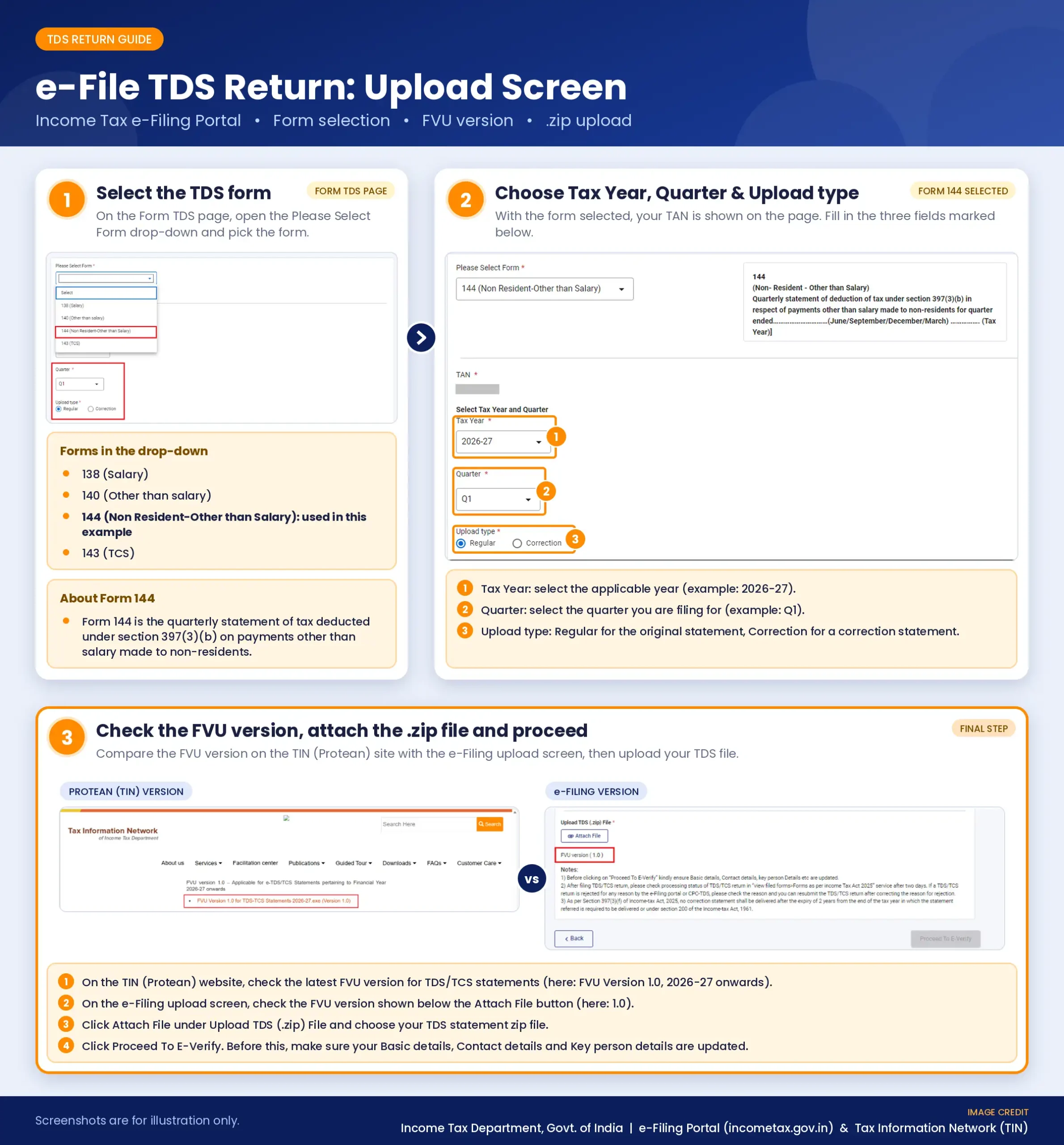
Open the TDS upload page. Depending on the current layout, it’s under e-File > Income Tax Forms > File Income Tax Forms > e-File TDS Return. Older guides call it TDS > Upload TDS.
Choose the Income-tax Act, 2025, the form, the tax year, the quarter and Regular as the upload type.
Upload the file from the FVU. The portal asks for it in zipped form.
Verify it: use a DSC (upload the signature file you create with the DSC Management Utility) or an EVC (for example through net banking or Aadhaar OTP). Check which option applies to you. Companies and audited entities are generally expected to use a DSC.
Two rules to remember: only regular statements are uploaded on this portal (corrections are done on TRACES), and if your statement was already submitted through a TIN Facilitation Centre, don’t upload it again.
Step 7: Check that it was accepted
After you upload, the status shows Uploaded. Once the portal validates the file, it shows Accepted or Rejected, usually within about a day. You can see it under View Filed TDS (the menu name may differ slightly). Save the acknowledgement.
If it says Rejected, read the reason, fix the file in the RPU, validate it again and upload it again before the due date.
After You File: What Happens Next
Processing: TRACES processes your statement. A few days later, log in and check for defaults such as a challan mismatch, a missing PAN or short deduction.
TDS certificates: you owe each deductee a certificate. From tax year 2026-27, the salary certificate Form 16 is Form 130, and the non-salary Form 16A is Form 131. See our due dates guide for the deadlines.
Corrections: if the statement has errors, file a correction (see below).
How to File a Nil TDS Return
If you didn’t deduct any TDS in a quarter, you generally don’t need to file a statement for it. If you deducted tax in even one month of that quarter, file a statement for the whole quarter. If you’re not sure, ask your CA before skipping a quarter.
How to File a Revised (Correction) TDS Return
Made a mistake? You don’t start over. You file a correction statement. Common reasons are a wrong PAN, wrong challan details, a missed deductee or a wrong amount. Corrections are requested on TRACES, after logging in with your TAN, because the e-filing portal only accepts regular statements. For Q4 of FY 2025-26 or earlier, corrections use the old forms.
Common Mistakes and Quick Fixes
Mistake
How to avoid it
Wrong or invalid PAN
Check every PAN before you prepare the statement
A challan is missing in the RPU
Your CSI date range was too short. Download again, including early deposits in the next month
Using old form numbers for tax year 2026-27
Use Forms 138, 140, 144 and 143
Wrong quarter or tax year selected
Check both before you submit the upload
Forgetting the late fee
The fee under Section 427 must be paid before you file
Not completing DSC or EVC verification
The upload isn’t complete until you verify it
Filing on the last day
Portals slow down near deadlines. File 2 to 3 days early
What If You’re Late?
A late statement costs ₹200 for every day of delay under Section 427 of the Income-tax Act 2025 (formerly Section 234E). It can’t be more than the TDS in the statement, and you must pay it before you file. Interest under Section 398 must also be paid before you file. Our TDS return due dates guide has the details and examples.
Should You File It Yourself?
DIY works well when you have a handful of deductees and clean records. It gets harder with many deductees, several TANs, or a quarter that needs corrections. A single wrong PAN or challan mismatch can mean notices and rework. If that sounds like you, our TDS return filing services cover preparation, validation, upload and corrections.
FAQs
How do I file a TDS return online for the first time?
Pay the TDS, download your CSI file, prepare the statement in the RPU, validate it with the FVU, and upload it on the e-filing portal with your TAN login. Verify it with a DSC or EVC and check that the status shows Accepted.
Which form should I use to file a TDS return?
For tax year 2026-27, use Form 138 for salary, Form 140 for other payments to residents, Form 144 for payments to non-residents and Form 143 for TCS. Q4 of FY 2025-26 still uses the old forms.
What is a CSI file and how do I download it?
It’s the Department’s record of the challans you’ve paid under your TAN. Download it from the Challan Status Inquiry option in e-Pay Tax on the e-filing portal, or through the TAN-based view on the TIN OLTAS site.
Where do I upload a TDS return?
On the Income Tax e-filing portal, after logging in with your TAN credentials. Your TAN must be registered there as a tax deductor.
Can I file a TDS return without a DSC?
Often yes. You can verify with an EVC instead. Some deductors, such as companies and those whose accounts must be audited, are generally expected to use a DSC, so check what applies to you.
How do I check if my TDS return was accepted?
Open View Filed TDS on the e-filing portal. The status moves from Uploaded to Accepted or Rejected, usually within about a day.
What should I do if my TDS return is rejected?
Read the reason, correct the file in the RPU, validate it again with the FVU and upload it again, ideally before the due date.
How long does it take to file a TDS return?
With clean records and the challans paid, a small statement can take under an hour. Preparing the deductee data usually takes the longest.
How do I file a revised TDS return?
File a correction statement through TRACES. The e-filing portal only accepts regular statements.
Do I have to file a TDS return every quarter?
You file a statement for each quarter in which you deducted TDS. If you deducted none in a quarter, a statement is generally not needed for it.
Need Help Filing Your TDS Return?
Wrong PANs, missing challans and rejected files cost time and money. Our experts prepare, check and upload your TDS statements for you. See our TDS return filing services, or talk to a CoTaxo expert for a free consultation. If you deduct TDS on salaries, see our Payroll Services.
Submit your Details to get an Instant All-inclusive Quote and a FREE Expert consultation