How to Download GST Registration Certificate from GST Portal: Step by Step Guide
Reviewed by FCS Yogesh Kumar
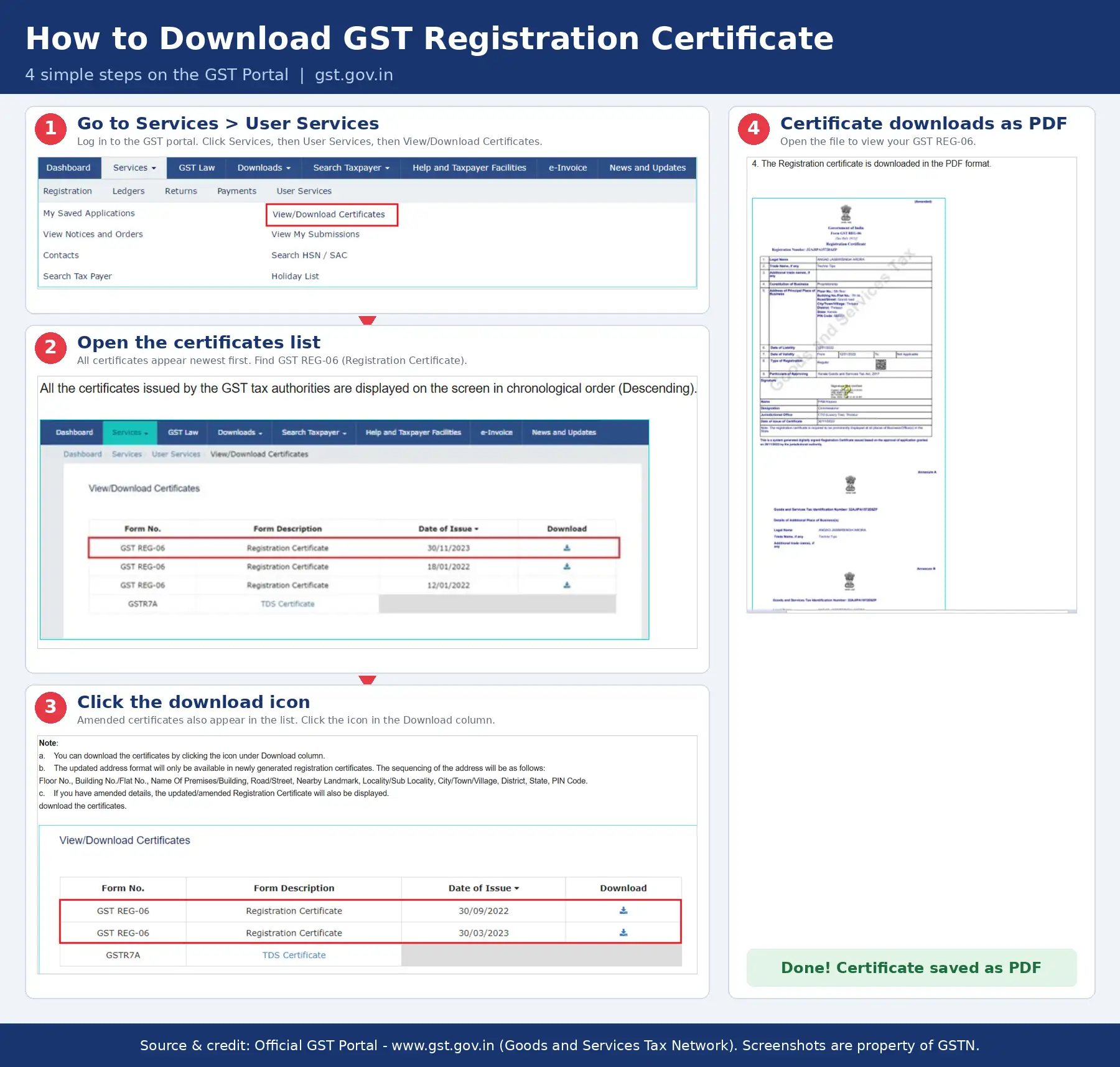
To download your GST registration certificate (Form GST REG-06), log in to gst.gov.in, click to Services > User Services > View/Download Certificates, and click the download next to Registration Certificate (Form GST REG-06). The PDF is free, needs no DSC (Digital Signature Certificate), and is available once your registration is approved.
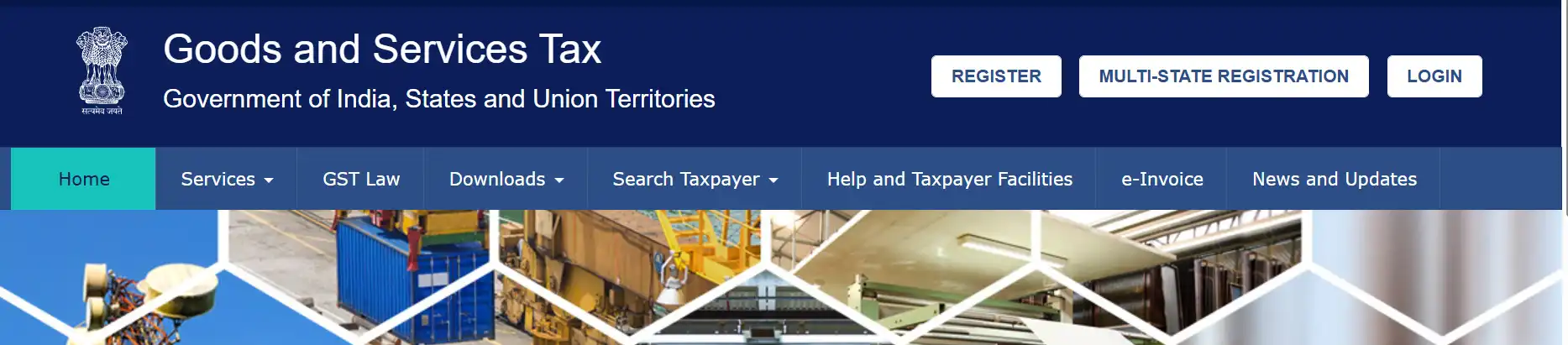
Open www.gst.gov.in and click Login.
Enter your username, password and captcha.
Go to Services > User Services > View/Download Certificates.
Find Registration Certificate (Form GST REG-06) and click the download button.
Open the PDF and check the GSTIN, legal name and addresses.
GST certificate download at a glance
Item
Answer
Form name
GST REG-06
Cost
Free
Where to find it
gst.gov.in > Services > User Services > View/Download Certificates
Login needed
Yes
DSC needed
No
Format
PDF, digital only (no physical copy is sent)
Validity
No expiry for regular taxpayers. Casual and non-resident taxable persons: generally up to 90 days unless extended
How to download GST certificate from the GST Portal: Everything You Need to Know About
The GST portal does not send a physical certificate. Your certificate exists only as a digital document, so you download and print it yourself.
Step 1: Open the GST portal. Go to www.gst.gov.in and click Login at the top right.
Step 2: Log in. Enter your username, password and the captcha, then click Login to reach your dashboard.
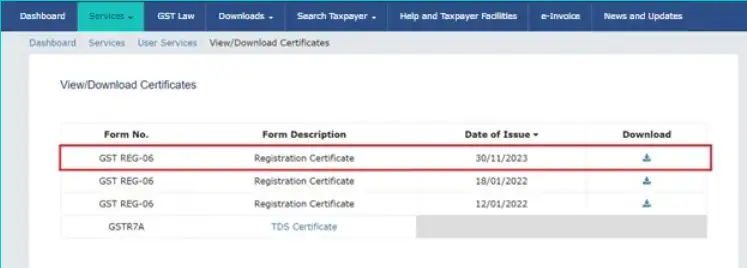
Step 3: Open the certificates page. From the top menu, go to Services > User Services > View/Download Certificates.
Step 4: Find the registration certificate. Look for Registration Certificate (Form GST REG-06) and check the issue date. The list shows the newest certificates first.
Step 5: Download. Click the download button next to the certificate. The PDF saves to your device.
Step 6: Check the details. Open the PDF and confirm the GSTIN, legal name, trade name, constitution of business and addresses. If anything is wrong, amend your registration (see below).
No Digital Signature Certificate (DSC) is needed just to download the certificate.
Tip: Save and print every page of the PDF, including Annexure A (additional places of business) and Annexure B. Banks and officers may ask for the full certificate, not just the first page.
First-time login after your GSTIN is approved
After approval, you receive a welcome email with your GSTIN and login credentials. Do not enter them on the normal login box. First-time users create their own username first.
Open www.gst.gov.in and click Login.
Use the first-time login option shown below the login box.
Enter the GSTIN and temporary password from the email, then the captcha.
When asked, create a unique username and set a new password.
After you log in, follow the download steps above.
Download the updated certificate after an amendment
If you changed your registration details, the updated certificate is available after the amendment is approved. The approval order for an amendment is Form REG-15.
Check your application status under Services > Registration > Track Application Status.
Once approved, go back to Services > User Services > View/Download Certificates.
Both your old and new certificates appear in the list. Download the new one and replace any older copy you shared with banks, vendors or auditors.
Can you download GST certificate without login?
Short answer: no. The official certificate PDF is downloaded after you log in. Without logging in, you can verify a business’s registration details, but that is not the same as downloading the certificate.
Many websites claim you can download the certificate from the Search Taxpayer page. The official GSTN manual for Search Taxpayer lists only profile details such as GSTIN, legal and trade name, effective date of registration, constitution of business, principal place of business and return status.
How to check a GSTIN without logging in
Go to www.gst.gov.in.
Click Search Taxpayer and choose search by GSTIN/UIN.
Enter the GSTIN and the captcha, then click Search.
Review the registration status and basic details shown.
This is useful for verifying a supplier or checking whether a registration is active.
Forgot your login details?
On the login page, tap Forgot Username or Forgot Password and follow the prompts. The portal may send an OTP to your registered mobile number or email to confirm it is you.
How to download GST registration certificate on mobile
You can do this from your phone without any app. The portal opens in your mobile browser and uses the same menu path as on a computer.
Open your phone browser and go to gst.gov.in.
Tap Login, then enter your username, password and captcha.
Open the menu (three lines) if you see one, then tap Services.
Tap User Services, then View/Download Certificates.
Find Registration Certificate (Form GST REG-06) and tap the download icon beside it.
Open the PDF from your phone’s downloads folder and check every page.
If the page looks cramped or a button does not respond, switch your browser to desktop site view and try again.
GST certificate not downloading? Common problems and fixes
Certificate not visible after approval
Check whether your application is actually approved. Go to Services > Registration > Track Application Status. The certificate appears only once registration is approved. For a full walkthrough using your ARN, TRN or Temporary ID, read our guide on how to check your GST registration status online.
Forgot username or password
Use the forgot username or forgot password option on the login page.
Login, captcha or OTP errors
Re-enter the captcha carefully, refresh the page, try another browser, and make sure your registered mobile number and email are reachable.
Certificate shows wrong details
File an amendment of registration on the portal, wait for approval, then download the updated certificate. Core-field changes such as legal name or principal place of business need officer approval, while non-core changes are approved more simply.
If you would like an expert to guide you through GST changes, our Online CA Services team can help.
Your registration is cancelled or suspended
Check the live status using Search Taxpayer before sharing any older certificate with others.
PDF shows a signature warning
If you open the certificate in a mobile viewer or a basic PDF reader, it may show a signature warning. This often happens outside Adobe Reader and does not by itself mean the certificate is invalid. Open the file in Adobe Reader to check the signature.
What is a GST registration certificate (Form GST REG-06)?
The GST(Goods and Services Tax) registration certificate is an official document issued after your GST registration is approved. It is issued in Form GST REG-06 and confirms your GSTIN and that your business is registered for GST.
Businesses use it to open bank accounts, apply for loans, onboard with vendors and marketplaces, and prove they can collect GST. Furthermore, it enables businesses to eliminate cascading taxes, unlock seamless input tax credits to reduce procurement costs, and manage a simplified online compliance system. It is free to download. Charges you may see elsewhere relate to professional help with registration, not to the portal download.
If you have not registered yet, our GST registration service can handle the application for you.
What is inside the GST certificate? Understanding Your GST REG-06
When you open that PDF, you’ll notice it is multi-page document.
Part
What it contains
Main page (REG-06)
GSTIN, legal name, trade name, constitution of business, date of liability, period of validity, type of registration, principal place of business, digital signature, plus approving officer details on officer-issued certificates
Annexure A
Additional places of business, such as branches and warehouses
Annexure B
Details of the proprietor, partners or directors. Some certificates show a photograph on this page.
Some certificates are generated by the system under the faster registration route, so they may not show an approving officer’s name, designation or jurisdiction.
How long is the GST certificate valid?
For regular taxpayers, the certificate has no expiry date. It stays valid until the registration is cancelled or surrendered. Casual taxable persons and non-resident taxable persons are generally registered for up to 90 days, unless the registration is extended.
Is it mandatory to display the GST certificate? (Rule 18)
Yes. Rule 18 of the CGST Rules sets two display requirements.
Rule 18(1): Every registered person must display the certificate of registration in a prominent location at the principal place of business and at every additional place of business.
Rule 18(2): Every registered person must display the GSTIN on the name board at the entry of the principal place of business and every additional place of business.
Composition taxpayers must also state on the name board that they are a composition taxable person, along with the GSTIN.
Penalty for not displaying the certificate or GSTIN
The GST law has no separate penalty for this specific default. The general penalty under Section 125 of the CGST Act applies, and it may extend to Rs 25,000. State GST laws have a parallel provision. Actual penalties depend on the case, so consult a tax professional if you receive a notice.
What to do after you download your GST certificate
Getting the certificate is the first step. Here is what usually comes next.
Display it. Put the certificate and your GSTIN on display at every place of business, as explained in the Rule 18 section above.
Download the certificate after login from Services > User Services > View/Download Certificates.
It is Form GST REG-06, free to download and delivered only in digital form.
Search Taxpayer lets you verify a GSTIN without login, but it does not replace the certificate download.
After any approved amendment, download the updated certificate and replace old copies.
Display the certificate and your GSTIN at every place of business.
Frequently Asked Questions
Is it free to download the GST certificate?
Yes. Downloading the certificate from the GST portal is free.
Can I download the GST certificate without login?
No. You can view basic registration details through Search Taxpayer without login, but the certificate PDF is downloaded after you log in.
Can I download the GST certificate by GSTIN or PAN?
You can search a GSTIN on the portal’s Search Taxpayer page to verify a business’s registration details. The certificate PDF itself is downloaded after you log in.
How do I download the GST certificate as a PDF?
Log in to gst.gov.in, go to Services > User Services > View/Download Certificates, and click the download icon next to Form GST REG-06. The certificate downloads as a PDF.
Do I need a DSC to download the GST certificate?
No, a Digital Signature Certificate is not needed to download REG-06.
Who can download the GST certificate?
Anyone who has the login credentials for your GSTIN can download it, so keep your username and password private. Do not share them with agents you do not trust.
Where is the GST certificate on the portal?
Under Services > User Services > View/Download Certificates after you log in.
How do I get the updated certificate after an amendment?
Wait for the amendment to be approved, then download the updated REG-06 from the same certificates page.
Does the GST certificate expire?
Not for regular taxpayers. Casual and non-resident taxable persons are generally registered for up to 90 days unless extended.
Is the GST certificate the same as the GSTIN?
No. The GSTIN is your 15-digit registration number. The certificate is the document that shows it, along with your registration details.
Is one GST certificate valid for all states?
No. GST registration is state-wise, so a business operating in several states generally needs a registration in each state.
Sources and references
GST Portal: www.gst.gov.in
GSTN manuals: View/Download Certificates and Search Taxpayers using GSTIN/UIN (tutorial.gst.gov.in)
CGST Rules, 2017: Rule 18 and Section 125 of the CGST Act
This article is for general information and is not tax or legal advice. Check the live GST portal and consult a tax professional for your specific case.
Submit your Details to get an Instant All-inclusive Quote and a FREE Expert consultation